The Economics of the First Repurchase — “We Want a Higher Repurchase Rate.” But Where Exactly Do You Push?
If your 1st→2nd purchase conversion is 45% and your 2nd→3rd is 72%, the problem isn’t your “repurchase rate” as a whole
If your 1st→2nd purchase conversion is 45% and your 2nd→3rd is 72%, the problem isn’t your “repurchase rate” as a whole — it’s the first repurchase. Everything from the 3rd purchase on is already working, so your resources belong on lowering the 1st→2nd hurdle.
Public research data + sample data from a commerce brand · 12-month window · approx. 240,000 orders / approx. 94,000 purchasers. For every part, we also note the Laplace screen and settings where you can see that number./
The figures in this report are not real transaction data; they are sample values generated to reflect the distribution of Laplace benchmark metrics. They are not any specific customer’s actual figures — please use them to understand trends, not as absolute values.
PART 01 · First — which screen to open
You don’t need to go through every menu. We picked only the screens that produce the numbers in this report.
| Menu | Screen | Which number in this report | Priority |
|---|---|---|---|
| User Analysis | First Purchase / Repurchase | Conversion rate by step (42.5% → 57.8% → …) | Priority 1 |
| Custom Dashboard | Purchase Journey (Sankey) chart | Drop-off points by step, golden-window cumulative curve | Priority 1 |
| User Analysis | Repurchase Cycle | Median repurchase cycle | Priority 1 |
| Product Analysis | Product Repurchase Cycle | Cycle by product group (68–155 days) | Priority 1 |
| Product Analysis | First Purchase / Repurchase by Product | Acquisition products vs. repurchase products | Priority 2 |
| Cohort Analysis | Repurchase Rate / Churn Rate / LTV | Monthly cohort heatmap | Priority 2 |
| Strategy Design | Cross-selling | What customers buy next (entry-product design) | Priority 2 |
| Strategy Design | User Segments | Building the send list (1 purchase + N days elapsed) | Priority 2 |
| User Analysis | Conversion Target Export | Download the list as CSV | Priority 2 |
| P & L Analysis | Margin Rate / Contribution Margin Rate | Check that you didn’t simply buy conversions with discounts | Priority 3 |
You’ll rarely need to build a new dashboard
PART 02 · The first repurchase is the hardest — the numbers research confirms
Before looking at our own data, let’s set a baseline. These are findings from Smile.io, which analyzed data from 110 million shoppers and 250,000 commerce brands.
| Step | Probability of making the next purchase |
|---|---|
| 1st-purchase customers → 2nd | approx. 27% |
| 2nd-purchase customers → 3rd | approx. 49% |
| 3rd-purchase customers → 4th | approx. 62% |
Source: Smile.io — analysis of 110M shoppers / 250K brands
3 out of 4 first-time customers never come back. But of those who make a 2nd purchase, half go on to buy a 3rd, and the probability keeps climbing from there. Large-scale data consistently confirms that the steepest hurdle is 1st→2nd.
The value of clearing this hurdle has been measured, too.
-
Repeat customers’ AOV is about 67% higher than new customers’ — 58.9 (Adobe)
-
Acquiring a new customer costs 5–25 times as much as retaining an existing one (Harvard Business Review)
-
A classic study found that raising retention by 5pp lifts profits by 25–95% (Bain & Company)
And timing: about 60% of 2nd purchases happen within 90–100 days of the first, and after 100 days the probability falls below 10% (Metrilo·Bluecore). The first repurchase doesn’t happen “someday” — it’s an opportunity with an expiration date.
So far, these are other people’s numbers
PART 03 · Conversion rate by step — the first screen to open
Brand A is a Korean skincare brand. It runs its own online store alongside major online platforms and sells serums, creams, cleansers and sun care. As a consumable, repeat-purchase category, repurchases are the backbone of its revenue.
Before you read the numbers
| Annual orders | Annual purchasers | Lifetime first-time buyers | Platforms : Own store |
|---|---|---|---|
| approx. 240K | approx. 94K | 71,480 | 72 : 28 |
Where to look in Laplace — User Analysis › First Purchase / Repurchase
How to set it up
-
Set the date range to 12 months. If your category’s repurchase cycle is 1–2 months, a 1-month range will understate repurchases. Use at least 3 months — ideally 12.
-
Change the User Segments setting from “First Purchase / Repurchase” to “Purchase count.” The data splits by purchase number: 1, 2, 3…
-
Under Metrics, turn on both payment amount and paying customers. Conversion must be calculated on customer counts — with amounts, you can’t filter out the illusion created by “one person buying big.”
-
Divide each purchase number’s customer count by the previous one. 2nd ÷ 1st = 1→2 conversion rate.
-
Under Filter › Sales channel, select a single channel and pull the same table again. PART 05, pitfall ③ explains why.
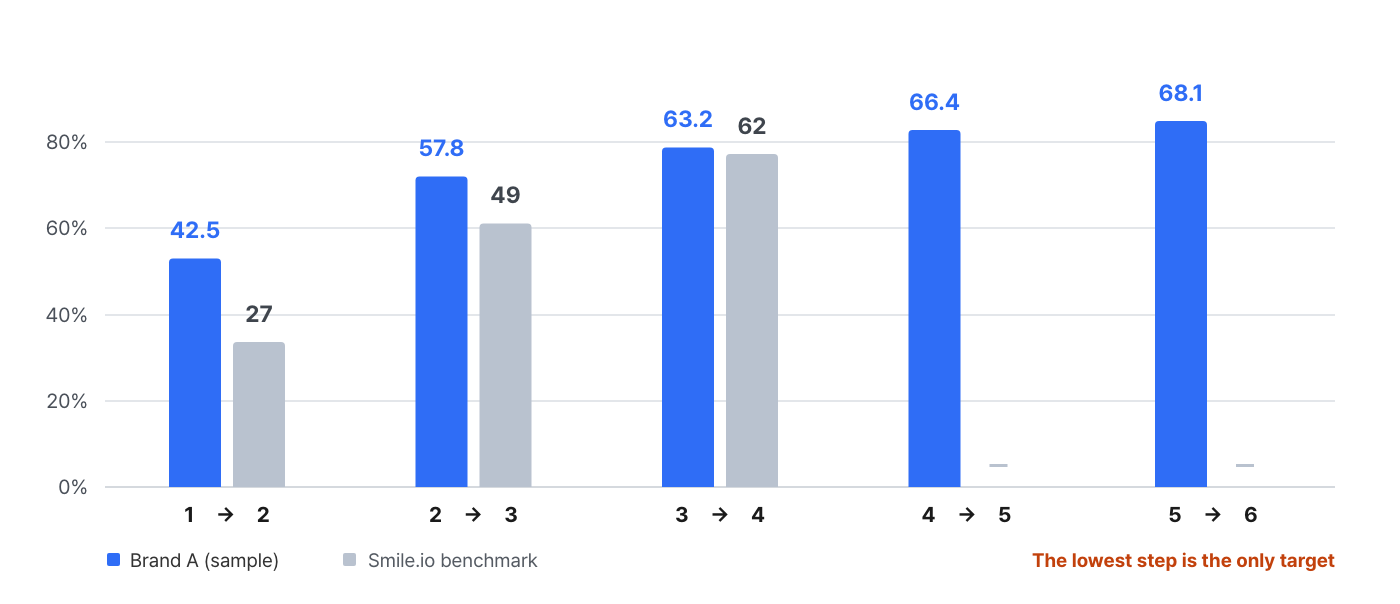
| Step | Customers reached | Conversion rate | Benchmark | Difference |
|---|---|---|---|---|
| 1st purchase | 71,480 | Base | — | — |
| 1st → 2nd | 30,379 | 42.5% | 27% | +15.5pp |
| 2nd → 3rd | 17,559 | 57.8% | 49% | +8.8pp |
| 3rd → 4th | 11,097 | 63.2% | 62% | +1.2pp |
| 4th → 5th | 7,368 | 66.4% | — | — |
| 5th → 6th | 5,018 | 68.1% | — | — |
Conversion rate = customers reaching the step ÷ customers reaching the previous step. Refunded and canceled orders excluded.
How to read the numbers
-
The steepest point is 1st→2nd. 42.5% → 57.8% → 63.2% → 66.4% → 68.1%. Conversion rises monotonically with each step and is nearly flat from the 4th purchase on. The shape matches the benchmark.
-
The level is 1.6 times the benchmark. This brand is relatively good at generating first repurchases. Even so, 1→2 is still the biggest loss point.
-
There’s little reason to spend resources beyond the 3rd purchase. Raising 3→4 from 63.2% to 68% affects a pool of only 17,559 people. Raising 1→2 from 42.5% to 48% acts on a pool of 71,480 and moves roughly 3,900 more people across.
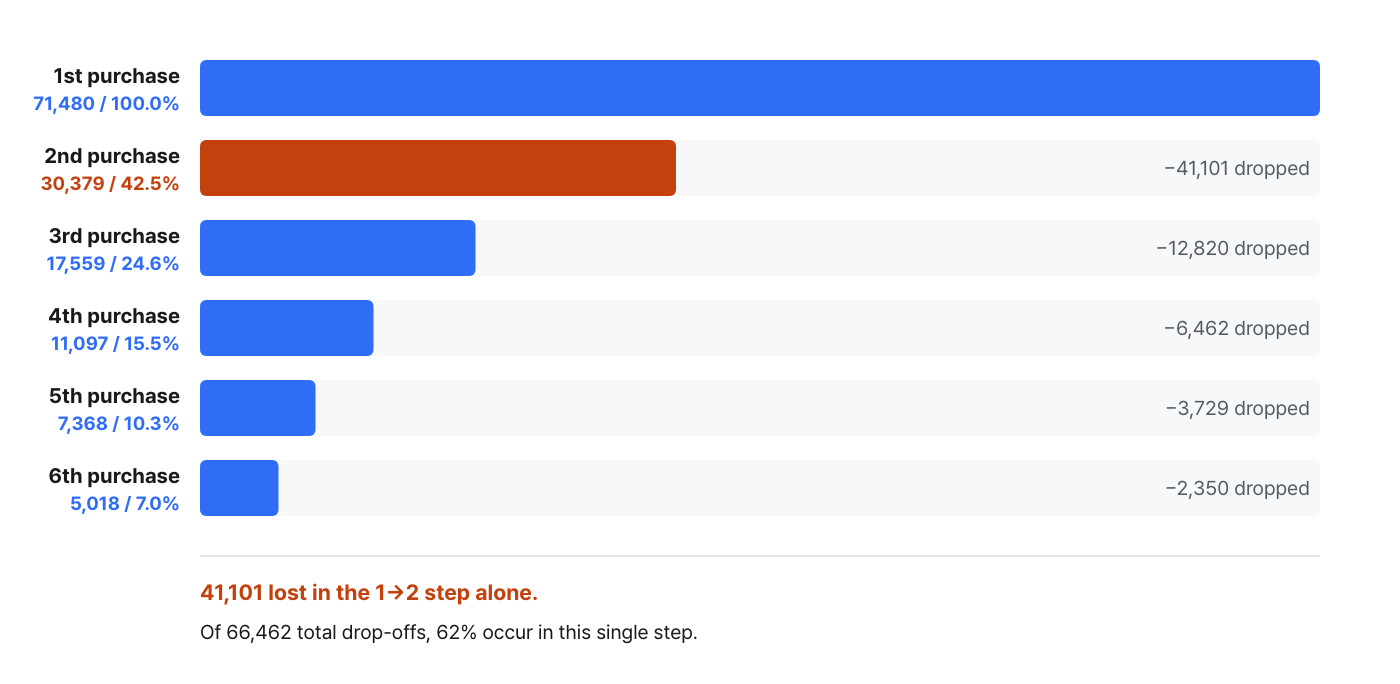
Figure 2. Of 66,462 total drop-offs, 41,101 (62%) occur in the single 1→2 step.
So the first question isn’t “What’s our repurchase rate?”
Next screen — We now know “1→2 is the problem.” But we don’t yet know how many days later to step in. On to the Purchase Journey chart in PART 04.
PART 04 · The golden window — how many days later to send a reminder
Repeat the same analysis while changing the conversion window, and a curve reveals when first repurchases cluster.
Where to look in Laplace — Custom Dashboard › Add chart › Purchase Journey (Sankey)
How to set it up — the order matters
-
Set the data source to Orders. Setting it to products (base product orders) inflates the numbers — PART 05, pitfall ①.
-
Set the analysis unit (dimension) to an attribute attached once per order, such as sales channel, payment method or device. The default is “Product name,” so don’t leave it as is. This one field changes conversion from 42.5% to 51.8%.
-
Set the cohort to “Nth purchase” = 1. Leave it blank and it falls back to “first order within the date range,” overstating conversion.
-
Set max steps to 6 and turn on exclude refunds/cancellations.
-
Run it once with the conversion window left blank — that’s your final conversion rate. Then re-run it with 30 · 60 · 90 · 180 days to build the cumulative curve. Figure 3 below was built this way.
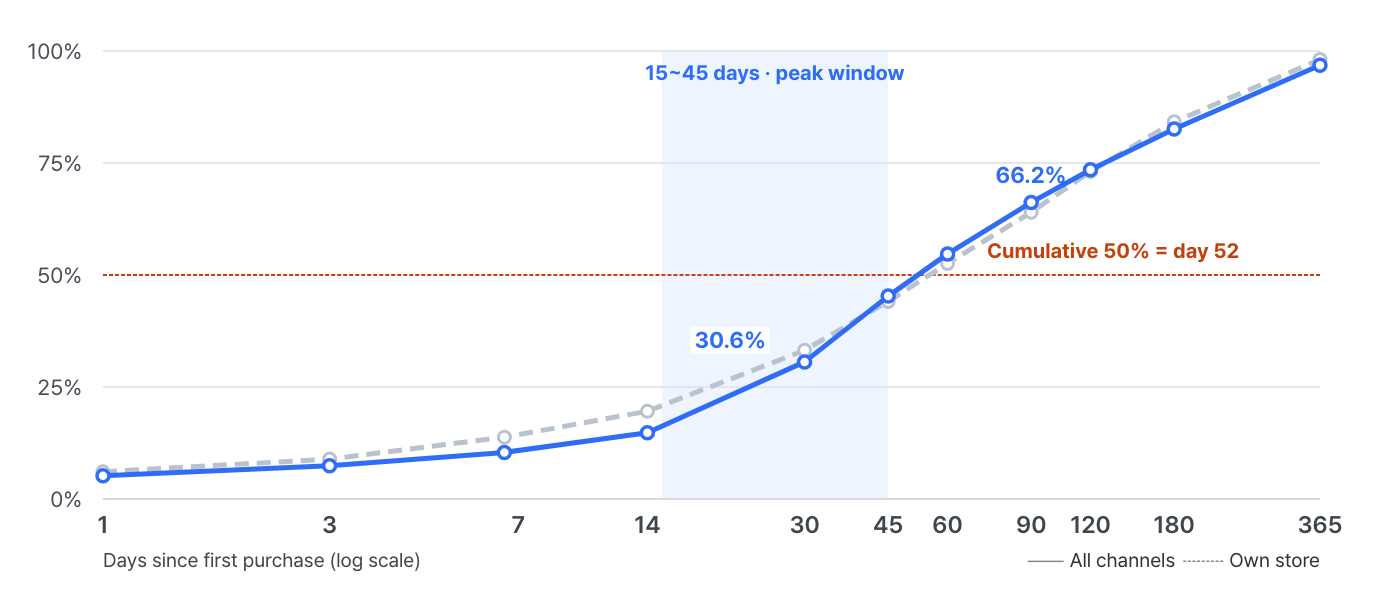
Figure 3. Cumulative share, with final 2nd-purchase customers (30,379 total / 5,760 own store) set to 100%. Log-scale horizontal axis.
| After 1st purchase | Cumulative 2nd-purchase customers | Share of final | Own store only |
|---|---|---|---|
| Within 1 day | 1,580 | 5.2% | 6.1% |
| Within 7 days | 3,159 | 10.4% | 13.8% |
| Within 14 days | 4,496 | 14.8% | 19.6% |
| Within 30 days | 9,296 | 30.6% | 33.2% |
| Within 45 days | 13,762 | 45.3% | 44.1% |
| Within 60 days | 16,617 | 54.7% | 52.6% |
| Within 90 days | 20,111 | 66.2% | 64.0% |
| Within 120 days | 22,329 | 73.5% | 73.1% |
| Within 180 days | 25,093 | 82.6% | 84.2% |
| Within 365 days | 29,407 | 96.8% | 98.1% |
| No limit | 30,379 | 100% | 100% |
How to read the numbers
-
The cumulative share passes 50% at about 52 days. Half of all first repurchases are done within 7–8 weeks.
-
The densest window is days 15–45. In these 31 days, 30.5pp of all first repurchases occur — an average of 0.98pp per day, 2.6 times the rate of the 60–90-day window (0.38pp/day).
-
66% are done within 90 days. That lines up with the benchmark’s “about 60% within 90–100 days.” But “below 10% after 100 days” doesn’t hold here — 27% still remain after 120 days.
-
The golden window doesn’t follow the channel. The own store’s final conversion rate is far lower than the overall figure (PART 05), yet its cumulative shares at 30, 60 and 90 days are nearly identical to the overall ones. Timing is set by how fast products get used up; conversion is set by channel and CRM.
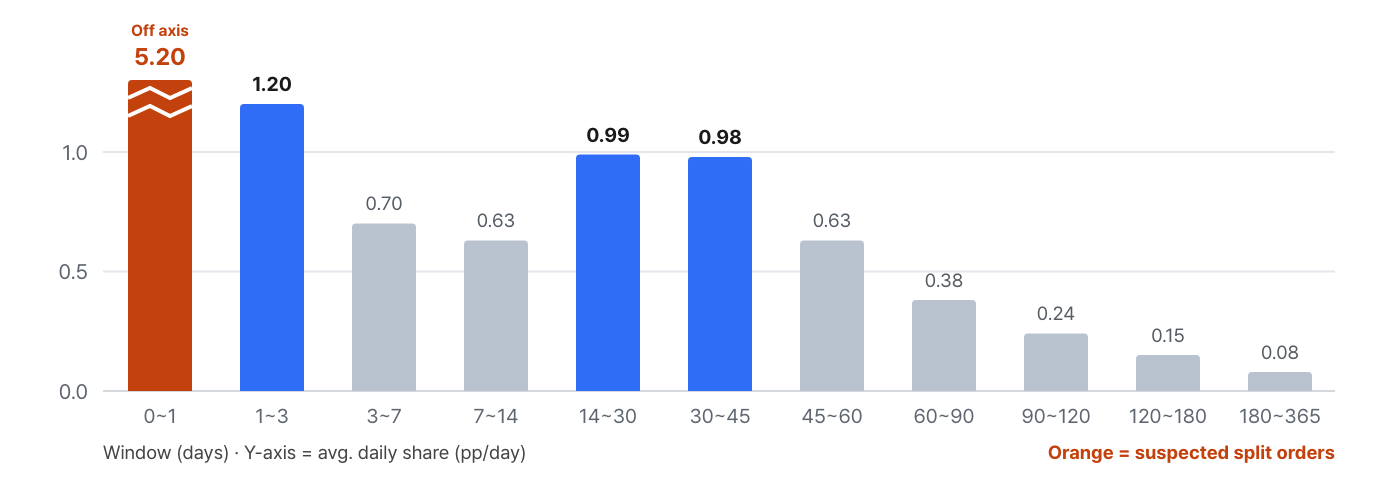
Figure 4. Average daily occurrence by window (pp/day). The 0–1-day bar runs off the axis — it’s a suspected split-order window, covered separately in PART 05, pitfall ②.
“52 days” and the “76–155-day product-group cycles” later on are different values
The cycle doesn’t shorten as steps go up
| After previous purchase | 1st → 2nd | 2nd → 3rd |
|---|---|---|
| Within 30 days | 30.6% | 32.9% |
| Within 60 days | 54.7% | 57.9% |
| Within 90 days | 66.2% | 69.1% |
| Within 180 days | 82.6% | 84.7% |
Cumulative share, with each step’s final converters set to 100%. Pull the Purchase Journey chart twice, with “Nth purchase” set to 1 and to 2.
They almost overlap. What changes as steps go up is the conversion rate (42.5% → 57.8%); the cycle doesn’t change. In practice, that’s good news — you don’t need to design reminder timing separately for each purchase number. What should differ by purchase number isn’t the timing but the message and the offer.
Next screen — We have the timing. But all of these numbers came out differently at first. Let’s first go over what we fixed.
PART 05 · 4 pitfalls that ruin your numbers
The tables above initially came out with different numbers. They only reached their current values after we sorted out the four issues below. All use the same data, the same period and the same cohort.
Pitfall ① Using products as the analysis unit inflates conversion
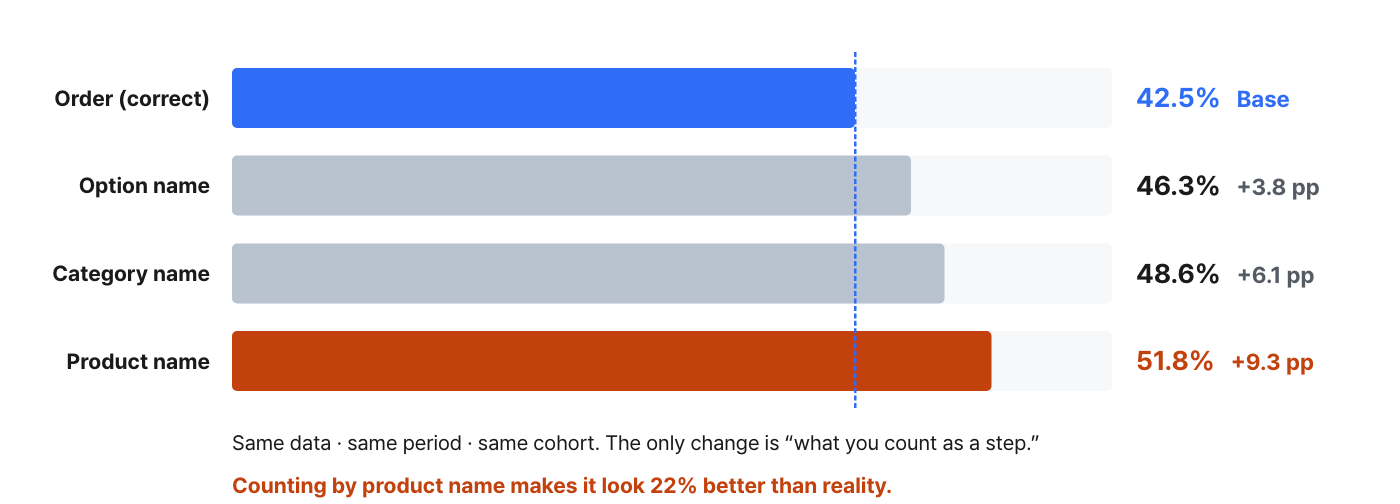
Figure 5. 1→2 conversion when only the Purchase Journey chart’s “analysis unit” is changed.
| Analysis unit | 1→2 conversion | Inflation |
|---|---|---|
| Order (correct) | 42.5% | — |
| Option name | 46.3% | +3.8pp |
| Category name | 48.6% | +6.1pp |
| Product name | 51.8% | +9.3pp |
The cause fits in one sentence: if one order contains 3 products, counting by product turns it into “3 purchases.” The more sets, bundles and 1+1 (buy-one-get-one) promotions a brand runs, the bigger the inflation. In this example it was 9.3pp — the numbers looked 22% better than reality.
The default is the trap
Pitfall ② If the median cycle is 0 days, it isn’t a repurchase
If you look at product units without knowing about ①, you get values like these.
| Analysis unit | Share “repurchased” within 1 day |
|---|---|
| Order unit | 5.2% |
| Category unit | 28.4% |
For a skincare brand, 28% of first repurchases happening within one day is impossible. In reality, these are split orders from the same cart, or several products in one order each being counted separately. At the product level, the median cycle for an “essence → cream” conversion shows up as 0.0 days — that’s buying together, not coming back.
What to check
Pitfall ③ Mixing channels misrepresents how well you’re actually doing
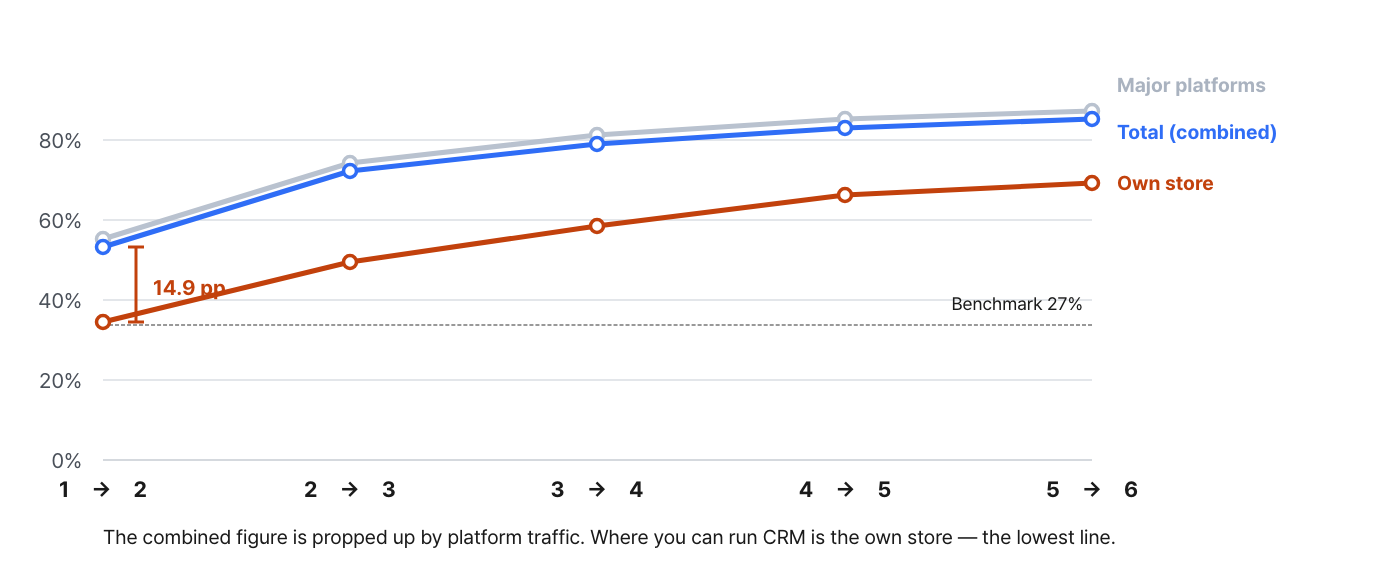
Figure 6. Pulled separately by applying a sales-channel filter to the Purchase Journey chart.
| Segment | First-time buyers | 1→2 | 2→3 | 3→4 | 4→5 |
|---|---|---|---|---|---|
| Total (combined) | 71,480 | 42.5% | 57.8% | 63.2% | 66.4% |
| Major platforms | 50,610 | 44.2% | 59.2% | 64.7% | 68.0% |
| Own store | 20,870 | 27.6% | 39.5% | 46.8% | 52.9% |
The overall 42.5% is a figure propped up by platform traffic, because 71% of first-time buyers come in through platforms. Look at the own store alone and it’s 27.6% — 14.9pp below the total, and in fact right at the benchmark level (27%).
This gap changes where your CRM targets are. The place where you hold contact details and messaging permission is your own store — and your own store is exactly the weakest segment. Platforms, by contrast, perform well, but you have almost no way to intervene directly. Look only at the combined number and this whole structure is hidden.
Store and sales channel are not the same thing
Pitfall ④ If metadata is empty, that dimension can’t be analyzed
In this sample brand, 76.4% of own-store first-purchase orders (15,945 of 20,870) come in with the category name left at its default (Uncategorized), because categories were never filled in for own-store products. Platform orders, by contrast, come with categories properly populated.
As a result, there is no answer to “which category, as an own-store entry point, produces customers who repurchase well?” That’s not a limitation of the analytics tool but a gap in the source data. Check these fields before you start the analysis; if they’re empty, either work around them at the product level or fill in the data.
3-minute pre-analysis checklist
Next screen — The numbers are now trustworthy. Next, we decide at the product level “what to use for the first purchase and when to suggest a refill.”
PART 06 · Which products drive repurchases
To lower the 1→2 hurdle, you need to know “what to bring customers in with” and “when to remind them.” Looking at repurchase rate and cycle together by product group settles both at once.
Where to look in Laplace — Product Analysis › Product Repurchase Cycle · Product Analysis › First Purchase / Repurchase by Product
How to set it up
-
Set the analysis unit to Base product. If you use “Product,” product names registered differently on each channel are counted separately and fragment the data. A base product is the unit that groups the same item together across channels.
-
Date range: 12 months. If you have long-cycle products (up to 155 days in this example), a short range won’t capture their repurchases.
-
On the Product Repurchase Cycle screen, get the median cycle for each product group. Use the median, not the mean — the mean gets pulled up by the few who return a year later (in this example: median 41 days vs. mean 79 days).
-
On the First Purchase / Repurchase by Product screen, get the repurchase share for each product group and put it on the vertical axis.
-
Plot the two values on a 4-quadrant chart. The upper right and lower right split into completely different actions.
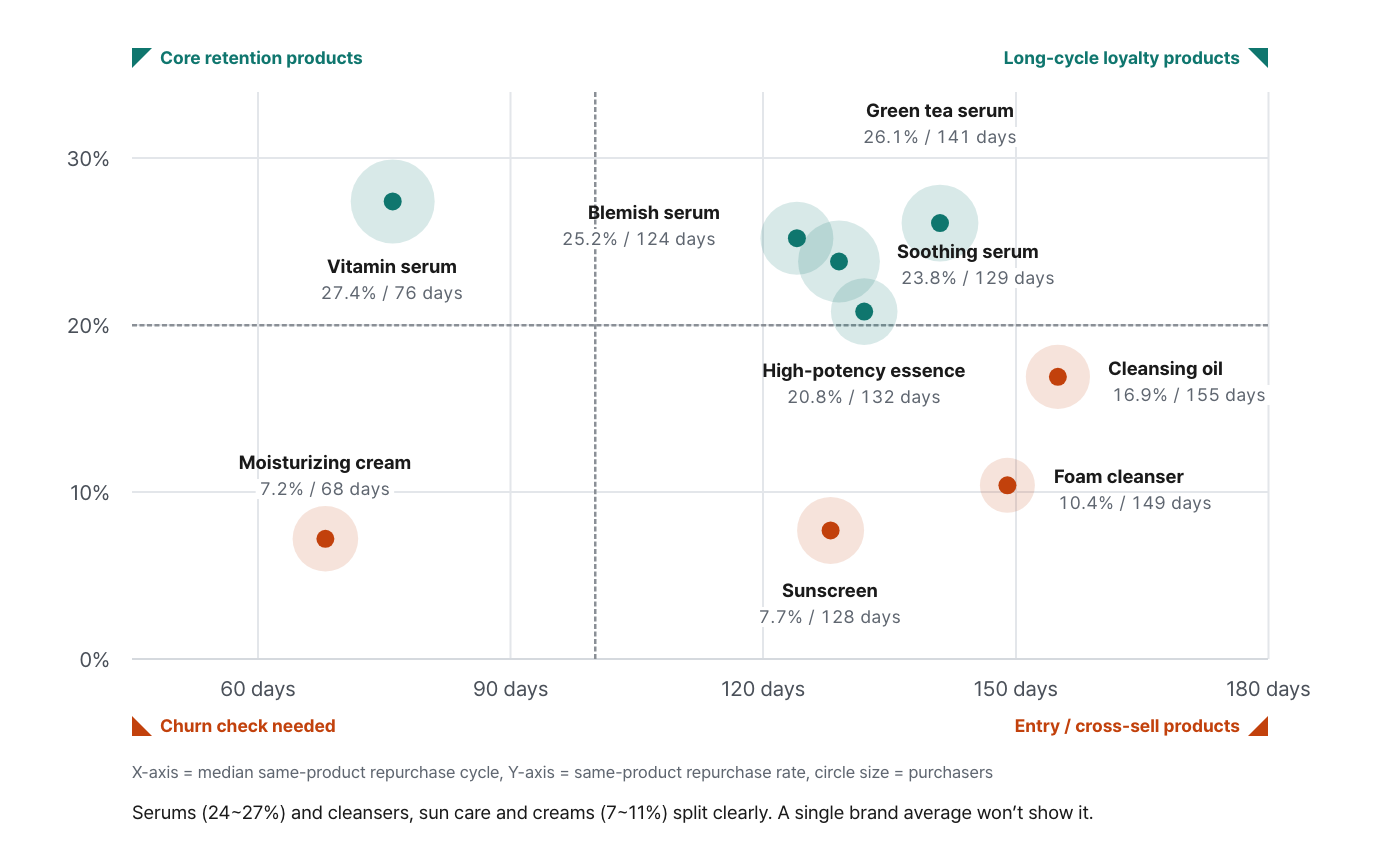
Figure 7. Circle size = number of purchasers.
| Product group | Purchasers | Repurchase rate | Median cycle | AOV index |
|---|---|---|---|---|
| Vitamin serum | 26,180 | 27.4% | 76 days | 100 |
| Green tea serum | 21,940 | 26.1% | 141 days | 133 |
| Blemish serum | 19,760 | 25.2% | 124 days | 84 |
| Soothing serum | 24,870 | 23.8% | 129 days | 87 |
| High-potency essence | 16,540 | 20.8% | 132 days | 95 |
| Cleansing oil | 15,320 | 16.9% | 155 days | 69 |
| Foam cleanser | 11,280 | 10.4% | 149 days | 62 |
| Sunscreen | 16,690 | 7.7% | 128 days | 57 |
| Moisturizing cream | 16,020 | 7.2% | 68 days | 88 |
Repurchase rate = share of customers who bought the product group and then bought the same product group again (order unit). AOV index = payment amount of vitamin serum orders set to 100.
How to read the numbers — the 4 quadrants split the actions
| Short cycle (~100 days) | Long cycle (100+ days) | |
|---|---|---|
| High repurchase rate | Core retention product — Vitamin serum (27.4% / 76 days). The most valuable spot. Push it as the first-purchase entry product and make the D+60–68 reminder your top priority. | Long-cycle loyalty products — Green tea (26.1% / 141 days), Blemish (25.2% / 124 days), Soothing (23.8% / 129 days). Customers do come back, but late. To keep them from churning in between, you need a D+105–135 reminder plus a cross-sell in the middle. |
| Low repurchase rate | Churn check needed — Moisturizing cream (7.2% / 68 days). The few who come back do so quickly. But 93% never return — if a product runs out fast yet isn’t repurchased, suspect satisfaction or price competitiveness. | Entry · cross-sell products — Sunscreen (7.7% / 128 days), Foam cleanser (10.4% / 149 days). Don’t expect single-product repurchases here. Use them as low-price entry products and design a path that moves customers to serums right after their first purchase. |
Depending on the product group, the repurchase rate ranges from 7.2% to 27.4% — a 3.8x spread. The dividing line is clear: functional active-ingredient serums sit at 24–27%, while cleansers, sun care and basic creams sit at 7–11%. It’s a structure you’ll never see from a single brand-wide repurchase rate.
“Repurchase rate by first-purchase product” falls into pitfall ①
Next screen — We know what to send and when. Now let’s check whether it actually makes money.
PART 07 · The 2nd purchase is bigger — but not by as much as the benchmark says
Where to look in Laplace — User Analysis › First Purchase / Repurchase → add Revenue per buyer to Metrics
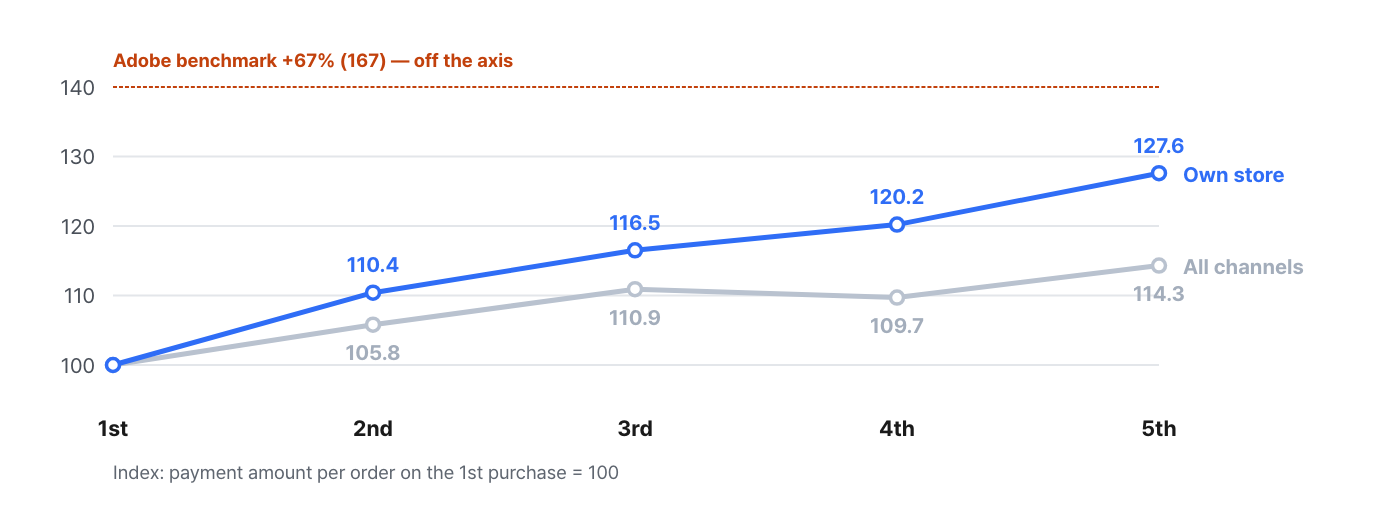
Figure 8. 1st = 100. The Adobe benchmark (+67%) is off the axis.
| Purchase number | All-channel AOV index | Own-store AOV index |
|---|---|---|
| 1st | 100.0 | 100.0 |
| 2nd | 105.8 | 110.4 |
| 3rd | 110.9 | 116.5 |
| 4th | 109.7 | 120.2 |
| 5th | 114.3 | 127.6 |
AOV rises with each purchase number. But it’s a long way from the +67% Adobe reports — in this example the 2nd purchase is +5.8% (own store +10.4%). Even by the 5th purchase it’s only +14.3% (own store +27.6%).
There are two likely reasons for the gap with the benchmark. Adobe’s figure is an average comparison of “new vs. repeat customers,” which mixes in multi-purchase buyers; and this brand sells many sets and promotional bundles on the first purchase, so the 1st-order AOV is already high. What matters isn’t matching the benchmark but confirming that your own curve is rising. If it is, driving repurchases pushes up revenue and profit at the same time.
What matters is that the own-store curve is steeper
PART 08 · How this differs from the Cohort screen
There are two screens for looking at repurchases. They slice the same data along different axes and answer different questions.
| Perspective | Cohort repurchase rate | Purchase journey (step) analysis |
|---|---|---|
| Axis | Time (monthly) | Purchase step (Nth) |
| Question | “What % remain after 3 months?” | “How many days until the 2nd purchase?” |
| Insight | Shape of the retention curve, acquisition quality | Conversion by step, drop-off points, cycles |
| Use | Comparing cohort quality, diagnosing monthly acquisition | CRM timing, entry-product design |
| Screen | Cohort Analysis › Repurchase Rate / Churn Rate / LTV | Custom Dashboard › Purchase Journey (Sankey) |
Where to look in Laplace — Cohort Analysis › Repurchase Rate / Churn Rate / LTV
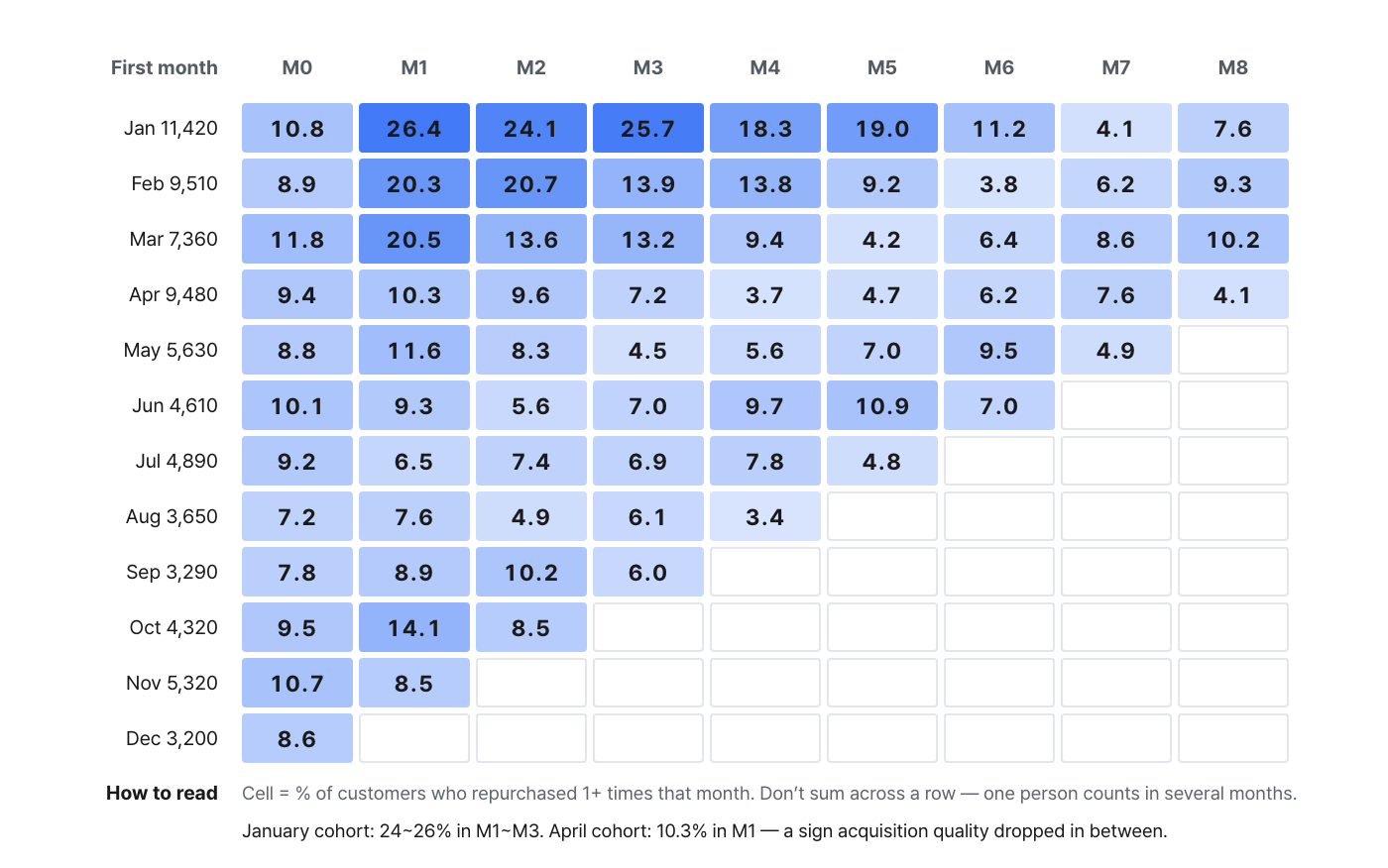
Figure 9. Rows = month of first purchase, columns = months elapsed. Darker means higher.
Here, you must not add up the cohort values and read the total as a “repurchase rate.” If one person repurchases in several months, they’re counted several times, so the total can exceed 100%. What a cohort answers is “what % were active this month”; “what % reached their lifetime 2nd purchase” (= 42.5%) only comes from the step axis.
Here’s how to divide the work between the two screens.
-
Cohort — for comparing monthly acquisition quality. The January cohort holds at 24–26% in M1–M3, while the April cohort drops to 10.3% in M1. Something changed in between — ad targeting or promotion mix — and you need to find that moment and look at the cause.
-
Steps — for deciding where to put resources, and for setting CRM send timing.
PART 09 · A 4-week action plan
Turning the sample values above directly into an action plan looks like this. Just swap in the numbers from your own data.
Week 1 — Diagnosis (analysis only)
-
In User Analysis › First Purchase / Repurchase, pull conversion by step with the “Purchase count” segment. The lowest step is your one and only target.
-
Pull the same table again by sales channel. The gap between the combined value and the own-store value is your “room for improvement through CRM.”
-
Run the 4-item pitfall checklist. If you see a median cycle of 0 days, stop here and fix the data first.
Week 2 — Lock in the timing
-
Build a Custom Dashboard › Purchase Journey chart and create the cumulative curve by changing the conversion window to 30 · 60 · 90 · 180 days. Find the point where the cumulative share hits 50% and the densest window. In this example, they’re 52 days and days 15–45, respectively.
-
Place the cross-sell reminder before the 50%-cumulative point — D+28–38 in this example. If you send at the median, half of your customers have already bought elsewhere.
-
Place the same-product refill reminder slightly before the product group’s median cycle. In this example: vitamin serum D+60–68, moisturizing cream D+55, long-cycle serums D+105–135, cleansers and sun care D+125–150.
-
Don’t split timing by purchase number (the cycle doesn’t depend on it). What you split is the offer.
Week 3 — Sending
-
Build the conditions in Strategy Design › User Segments: 1 purchase + N days since last purchase + no repurchase yet. This list is the exact population of the 1→2 hurdle.
-
Download a CSV with User Analysis › Conversion Target Export and upload it to your KakaoTalk notification (AlimTalk) or SMS tool.
-
Start with the weakest channel (in this example, the own store at 27.6%). That’s where the room for improvement is biggest — and where your messaging channels are.
-
Split messages by the product purchased. For product groups with 7–10% repurchase rates, send a serum cross-sell rather than a same-product reminder.
Week 4 — Validation
-
Compare the 1→2 conversion of the sent group vs. the non-sent group on the same basis (order unit, same period).
-
Pull the step curve again and check that only 1→2 went up. If 2→3 and beyond moved too, your segment is leaking.
-
In P & L Analysis › Margin Rate / Contribution Margin Rate, check that the AOV index curve holds. If you bought conversions with discounts, the 2nd-purchase index drops below 100 — meaning you grew repurchases but shrank profit.
Summary
-
A repurchase rate only means something once you break it into steps. A single average doesn’t tell you where to act. At 42.5% → 57.8% → 63.2%, the shape matched the benchmark, and the hurdle was at 1→2.
-
Put resources into 1→2 only. It’s the one step with the largest population and the lowest conversion. In this example, 62% of all drop-offs came from this single step.
-
Timing is decided by the cumulative curve. The cumulative share hits 50% at 52 days, and the densest window is days 15–45. Same-product repurchase cycles range from 68 to 155 days by product group (a 2.3x difference), so cross-sell reminders and refill reminders need separate timing.
-
Check unit, channel and metadata first. Using products as the analysis unit makes results look 22% better, and combining channels overstates your performance by 14.9pp.
-
Benchmarks are a direction, not a target. We were at 1.6 times the 27% benchmark, yet still lost 41,000 people before their first repurchase.
Minimum settings to reproduce this report with your own data
| Item | Value |
|---|---|
| Data source | Orders (not base product orders) |
| Date range | Fixed at 12 months (annual) |
| Cohort | Nth purchase = 1 (lifetime first-time buyers) |
| Analysis unit | Order attributes such as sales channel · payment method — never product name/category name |
| Max steps | 6 |
| Refunds/cancellations | Excluded |
| Conversion window | Blank → 30 → 60 → 90 → 180 days (repeat 5 times for the cumulative curve) |
| Channel split | Use the sales-channel filter to run own store / everything else once each |
The figures in this report are not real transaction data; they are sample values generated to reflect the distribution of Laplace benchmark metrics. They are not any specific customer’s actual figures — please use them to understand trends, not as absolute values. Sources are cited for each public research figure. Screen names and setting names may differ slightly depending on the release.