At what percentage should an alert fire? Thresholds calculated from a year of sales at two brands
We calculated alert thresholds from a year of daily sales at two brands. The commonly used ±15% fires on half of all day
We calculated alert thresholds from a year of daily sales at two brands. The commonly used ±15% fires on half of all days.
Conversations about report automation usually start with “let’s stop people hand-carrying numbers every morning.” That cost really is large — marketing practitioners spend an average of 16.4 hours a month just building reports (BeastMetrics, survey of 247 teams), and once you include data management and consolidation it reaches 14.5 hours a week (Treasure Data). Audit research has also found errors in 91–94% of manually built spreadsheets (Panko).
The figures in this report are not actual transaction data; they are illustrative values generated to reflect the distribution of Laplace benchmark metrics. They are not the actual figures of any specific customer, so please use them to understand trends rather than as absolute values.
PART 1. ±15% isn’t “abnormal” — it’s “normal”
“Notify me if sales move more than 15% versus the same weekday last week.” This is the most common setting when people build their first alert. Intuitively, 15% sounds like a pretty big change.
We checked it against a year of daily sales from two brands in different categories.
| Daily sales swing at Home & Kitchen A (median) | Daily sales swing at Sports & Outdoor B (median) | Share of days the alert fires at ±15% | Alerts you’d receive per month |
|---|---|---|---|
| 14.2% | 17.1% | 49–55% | 15–17 |
The median is already 14.2–17.1%. In other words, the swing on an “ordinary day” is already near the threshold. Define 15% as an anomaly signal and you also catch half of the days that aren’t anomalies.
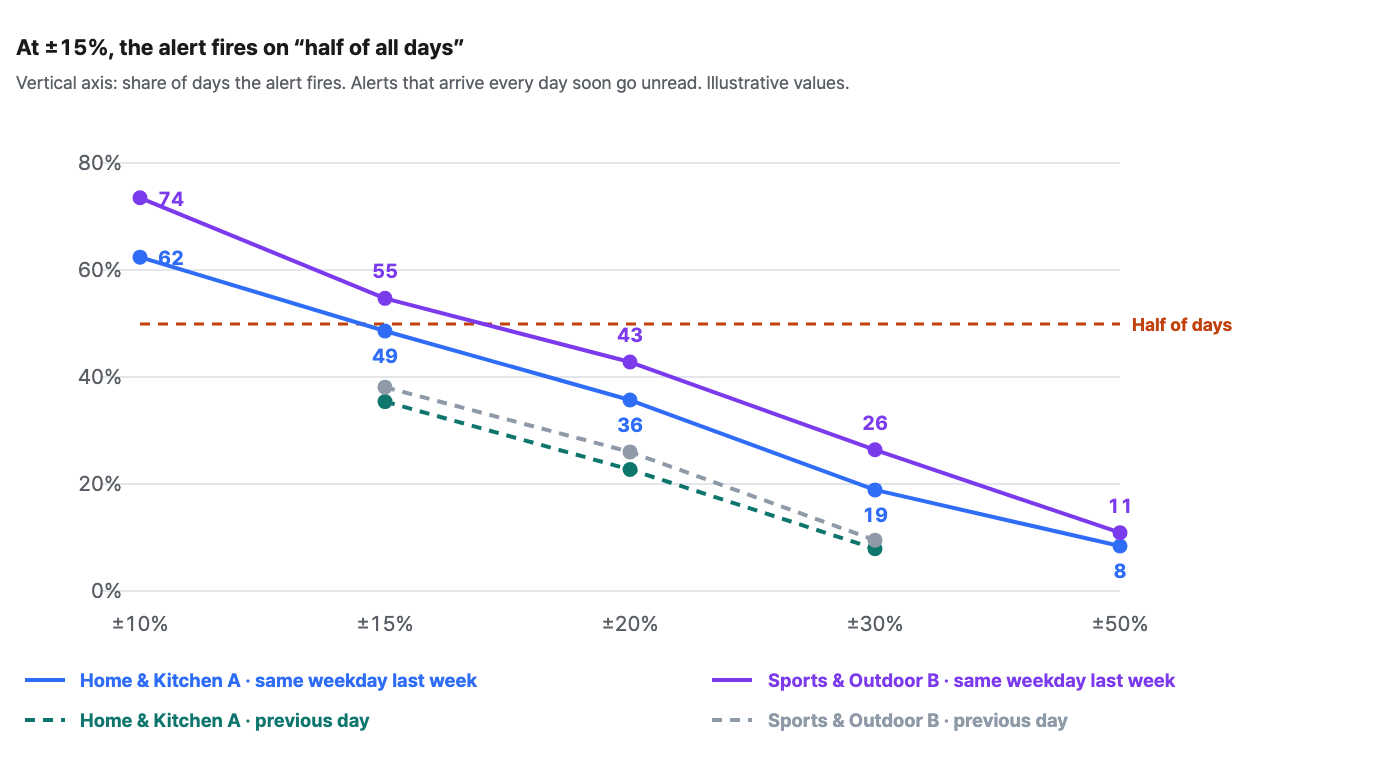
Lower it to ±10% and it fires on 62–74% of days — practically every day. Raise it to ±30% instead and it fires on 19–26% of days, down to 6–8 times a month. Doubling the threshold cuts firing by 2.1–2.6x.
| Threshold | Home & Kitchen A | Per month | Sports & Outdoor B | Per month |
|---|---|---|---|---|
| ±10% | 62.4% of days | 19.0 | 73.5% of days | 22.3 |
| ±15% | 48.6% of days | 14.8 | 54.7% of days | 16.6 |
| ±20% | 35.7% of days | 10.9 | 42.8% of days | 13.0 |
| ±30% | 18.9% of days | 5.7 | 26.4% of days | 8.0 |
| ±50% | 8.4% of days | 2.6 | 10.9% of days | 3.3 |
Where to find it in Laplace — Monitoring > Custom Alerts > Create Alert > Conditions
PART 2. “Compare with the same weekday last week” removes the day-of-week effect — but it’s noisier
The textbook approach to alert design is to compare with the same weekday last week. Comparing “yesterday vs. the day before” produces false alerts at the same spot every week because of weekend–weekday differences. We’ve recommended it that way ourselves.
Yet at these two brands, we got the opposite result.
| Comparison basis | Home & Kitchen A median | A p90 | Sports & Outdoor B median | B p90 |
|---|---|---|---|---|
| Same weekday last week | 14.2% | 44.9% | 17.1% | 53.7% |
| Previous day | 10.9% | 29.1% | 11.7% | 29.7% |
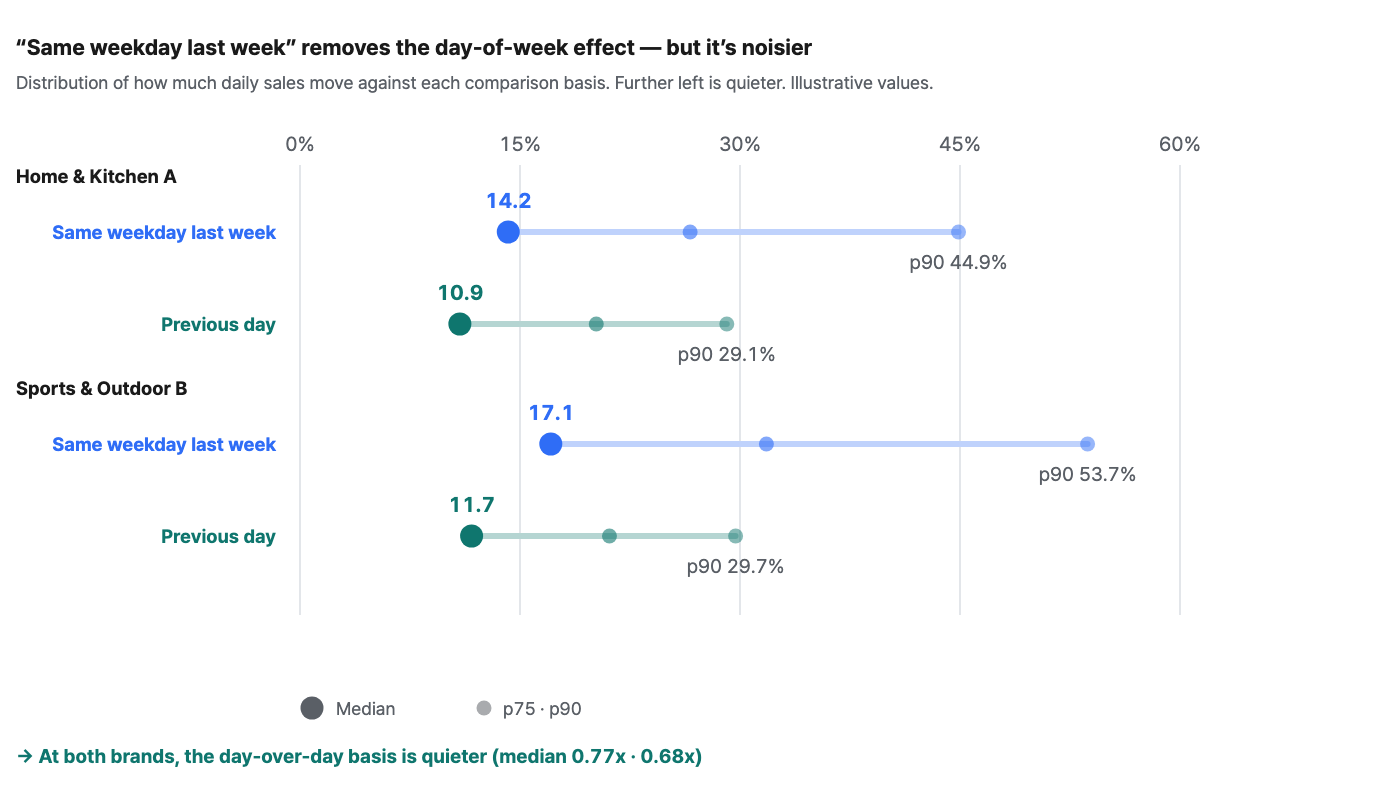
Day-over-day is 0.77x and 0.68x the same-weekday comparison — the previous-day basis is up to 32% quieter. Even at the same ±15% threshold, the previous-day basis brings firing down to 36–38% of days.
Why this happens becomes clear as soon as you look at the day-of-week index.
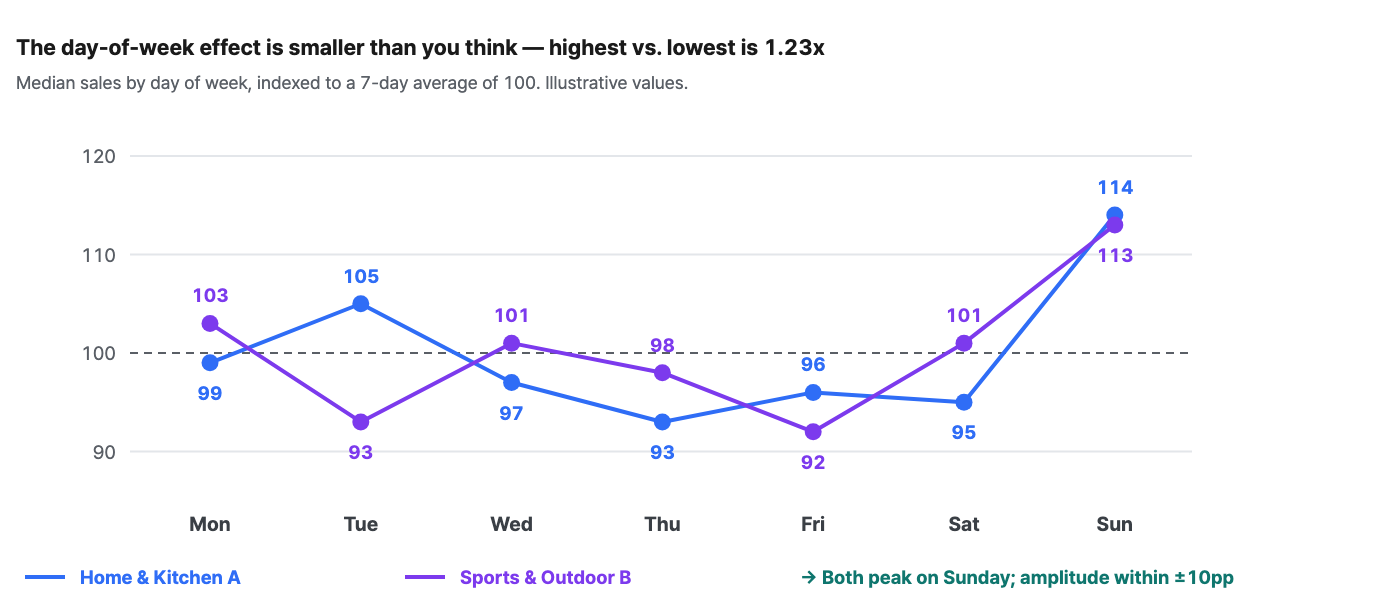
At both brands, the highest day-of-week index is 1.23x the lowest — an amplitude within ±10pp (A: Sunday 114 / Thursday 93; B: Sunday 113 / Friday 92). The trend and promotion swings that ride along when you skip back 7 days are larger than the day-of-week effect (±10pp) you’re trying to remove. Between yesterday and today there is only one day’s worth of change, but between the same weekday last week and today there is a whole week’s worth.
So the rule changes like this. “Same weekday last week” is the right answer only for brands with a strong day-of-week effect. If weekend sales are two or three times weekday sales, the same-weekday basis is right; if the day-of-week amplitude is within ±10pp, day-over-day is quieter. One look at your own brand’s day-of-week index settles which one you are — all it takes to build Figure 3 above is daily sales.
Where to find it in Laplace — Dashboard > Sales > Sales by Period
PART 3. An alert doesn’t end in one day — alert fatigue
More important than the “number” of firings is how those firings are distributed. Getting 15 alerts a month spread evenly is a completely different experience from getting two straight weeks of alerts followed by silence.
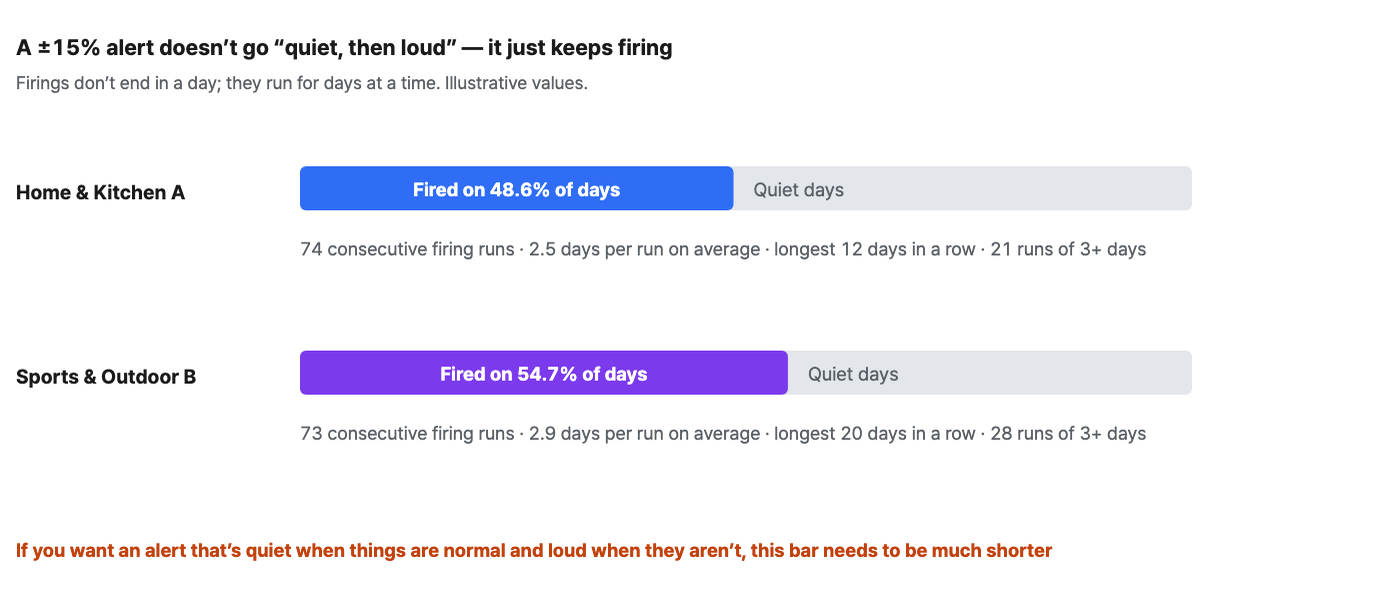
At ±15%, Home & Kitchen A fired on 187 of 384 days, clustered into 74 consecutive runs — an average of 2.5 days per run, with the longest lasting 12 days in a row. Sports & Outdoor B is worse: a longest run of 20 consecutive days, and 28 runs lasting 3 days or more.
By the principle that “a good alert is quiet when things are normal and loud when they aren’t,” ±15% is a setting with no quiet state at all. After receiving the same alert three days in a row, you won’t open it on the fourth. And once you stop opening it, you also miss the real anomaly signals that come after.
PART 4. Derive the threshold from the distribution, not from gut feeling
Flip the order and it becomes simple. Instead of “what percentage should we use?”, decide first “how many times a month do we want to be alerted?” The threshold then falls out of the calculation.
Three steps to setting a threshold
-
Decide the frequency you want — for an alert attached to a morning briefing, 2–4 times a month is realistic. Any more often and nobody reads it; any less and it isn’t really monitoring.
-
Find the quantile that matches that frequency — 3 times a month is the top 10% of observed days, so it’s p90.
-
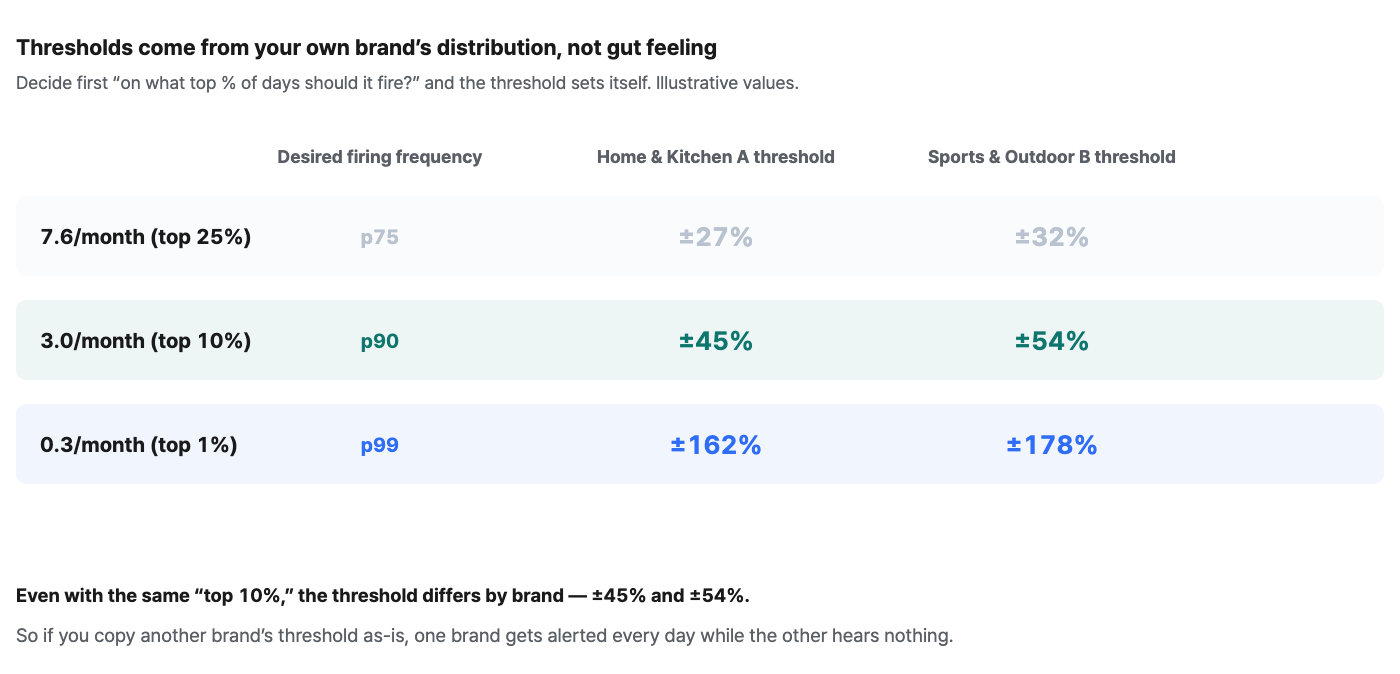
Read the p90 value from the distribution of daily sales change rates and use it directly as the threshold. For the two brands, it was ±45% and ±54% respectively.
Same “3 times a month,” yet the threshold numbers differ: ±45% and ±54%. Copy another brand’s threshold as-is, and one brand gets alerted every day while the other hears nothing at all. A threshold isn’t an industry standard; it’s a property of your own data.
| Alert type | Recommended frequency | Quantile | Home & Kitchen A | Sports & Outdoor B |
|---|---|---|---|---|
| Routine check (part of the morning briefing) | 7–8 times a month | p75 | ±27% | ±32% |
| Anomaly detection (standalone alert) | 3 times a month | p90 | ±45% | ±54% |
| Urgent (immediate check required) | Once a quarter | p99 | ±162% | ±178% |
If raising the threshold feels uncomfortable, split it. Instead of putting one threshold on one alert, separate them: “routine checks are a line inside the daily briefing; anomaly detection is a standalone alert.” A briefing that arrives every day needs no threshold — you open it every day anyway. Only alerts that pop up on their own need a threshold, and they mean something only if they’re rare.
Where to find it in Laplace — Monitoring > Custom Alerts > Create Alert
PART 5. So how should you set it up?
Applying the threshold rules, here are five alerts that are actually worth using.
| Alert | Schedule | Contents | Threshold |
|---|---|---|---|
| Morning sales briefing | Daily 09:00 | Yesterday’s confirmed sales · vs. same weekday last week · net sales by channel · order/refund counts | No conditions (scheduled send) |
| Sales anomaly detection | Daily 09:00 | Only on days the threshold is crossed · which channel and which product it happened in | Same-weekday p90 if the day-of-week amplitude is large; day-over-day p90 if small |
| Inventory alert | Daily 08:30 | SKUs expected to sell out within 30 days · products at reorder point · stock with no shipments for 90 days | No threshold needed — stockouts and reorder points are count-based |
| Weekly ad efficiency check | Mondays 10:00 | ROAS and POAS side by side by campaign · CPA spikes vs. last week · budget burn rate | p90 for CPA spikes only; show everything else in full |
| Monthly channel P&L | 1st of each month | Net sales, fees, ad spend and net margin rate by channel · sales rank vs. margin rank | No conditions (scheduled send) |
One thing to check before the threshold. A common failure of automated delivery is “it goes out automatically, but the numbers are still yesterday’s.” One survey found that 85% of data leaders said decisions made on stale data led to financial losses (IBM). Turn on the send after data refresh completes option first. Data integrity comes before send time.
Review after one month
-
Look at the open rate of each alert. That — not the number of alerts — is the success metric.
-
For an alert left unopened 3 times in a row, raise the threshold one step (p75→p90) or fold it into the briefing.
-
Conversely, if there’s a number people keep looking for in meetings, promote it to an alert.
-
Repeat the same review every quarter — as your brand grows, the distribution of change rates shifts too.
Summary
-
±15% is not an anomaly signal. At both brands, the median daily sales swing was already 14.2–17.1%, and a ±15% threshold fired on 49–55% of days.
-
“Compare with the same weekday last week” isn’t always quieter. If the day-of-week amplitude is within ±10pp, day-over-day is actually up to 32% quieter. Your own brand’s day-of-week index decides which applies.
-
How firings cluster matters more than how many there are. At ±15%, firing runs as long as 12–20 consecutive days — an alert with no quiet state soon goes unread.
-
Work the threshold backward from “how many times a month,” not “what percentage.” If you want 3 a month, plug in the p90 of the change-rate distribution.
-
Separate the briefing from anomaly detection. A briefing you open every day needs no threshold; only standalone alerts need to be rare to mean something.
Frequently asked questions
Q. How do we set the quantile if the observation period is short?
You need at least 3 months (about 90 days) for p90 to be stable. If you have less, start with p75 and raise it as data accumulates. For strongly seasonal brands, peak and off-peak distributions differ, so it’s safer to recalculate every six months.
Q. Do we set thresholds the same way for metrics other than sales?
Yes. For any metric with a change-rate distribution (order count, ad spend, CPA, refund rate), the sequence “desired firing frequency → quantile → threshold” works exactly the same. However, count-based metrics such as stockouts and reorder points are judged by counts, not distributions, so this method isn’t needed.
Q. If we raise the threshold, won’t we miss real incidents?
It’s the low threshold that makes you miss things. At ±15%, alerts fire for up to 12–20 days straight, and after that nobody opens them. Raise it to p90 and you get only 3 a month, but each one gets opened. Monitoring effectiveness should be measured by open rate, not by the number of firings.
References: BeastMetrics (survey of 247 teams) · Treasure Data · Panko spreadsheet audit research · Funnel · IBM data leader survey
The figures in this report are not actual transaction data; they are illustrative values generated to reflect the distribution of Laplace benchmark metrics. They are not the actual figures of any specific customer, so please use them to understand trends rather than as absolute values. Figures from public research are cited with their sources in each item. Screen names and setting names may differ slightly depending on the release.