We almost showed our agency our COGS by sharing a dashboard — a guide to designing data permissions
We opened up the permission settings of 8 brands. Over 90 days, there were 83 records of access being widened — and only
We opened up the permission settings of 8 brands. Over 90 days, there were 83 records of access being widened — and only 15 of it being narrowed.
The better a team uses data, the more it shares. Ad agencies, logistics partners, outsourced merchandisers, new hires — and, at companies running several brands, the managers for each brand. The problem is that sharing usually happens at the level of "the whole dashboard." You set out to show ad performance and end up exposing your COGS ratio; you set out to show inventory and end up exposing sales across every channel.
The figures in this report are not actual transaction data; they are illustrative values generated to reflect the distribution of Laplace benchmark metrics. They are not the actual figures of any specific customer, so please use them to understand trends rather than as absolute values.
PART 1. Which screens to open
Most discussions about permissions end in concepts. This one is written to end in four screens. First, let's lay out where to look.
| What you want to see | Screen | Which number in this report | Priority |
|---|---|---|---|
| Who can get in right now | Permission Settings › Members | 78 accounts with access, 27 with top-level access | Today |
| Are there invitations still unaccepted | Permission Settings › Invitations | 78 pending invitations | Today |
| How many roles there are and what they open | Permission Settings › Roles | 5 custom roles · 1 of 8 brands | This week |
| Who changed what, and when | Permission Settings › Audit Log | 229 records in 90 days | This week |
Where to look in Laplace — Permission Settings › Members / Invitations / Roles / Audit Log
Next screen — Now you know the screens. But first, let's confirm this is really a common problem. On to PART 2. ›
PART 2. Oversharing isn't an exception, it's a statistic — the numbers research has confirmed
Before looking at our own data, let's set a baseline. How often "access granted to partners" leads to incidents has already been measured at scale.
| Study | Confirmed figure |
|---|---|
| Verizon DBIR 2025 (22,052 incidents · 139 countries) | The share of breaches involving a third party doubled from 15% to 30% in a single year |
| Verizon DBIR 2025 (EMEA) | 29% of breaches start inside the organization — 19% from unintentional mistakes, 8% from privilege misuse |
| IBM Cost of a Data Breach 2025 | The most expensive attack vector is the malicious insider (about USD 4.92 million on average) |
| IBM Cost of a Data Breach 2025 | Breaches via the supply chain or third parties take 267 days on average to resolve |
"Up to here, these are other people's numbers"
Next screen — That's it for other people's numbers. Now we open real permission settings. On to PART 3. ›
PART 3. Permissions only ever grow
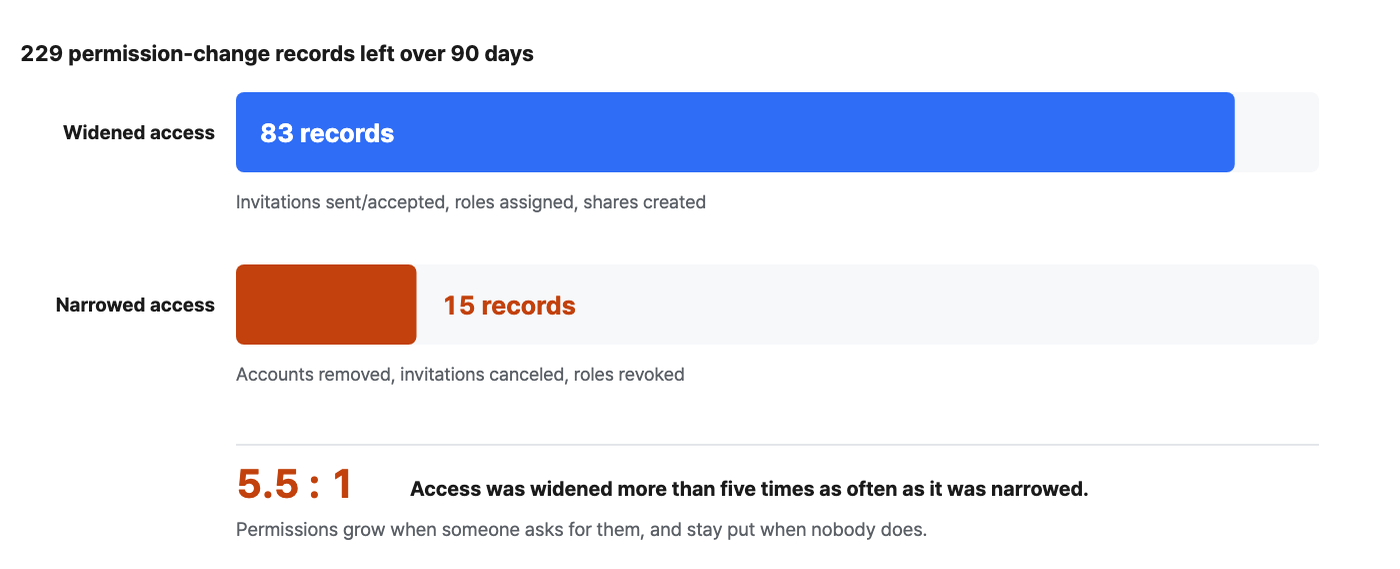
We split 229 permission-change records from 90 days across 8 brands into "widened" and "narrowed." Widening means sending or accepting an invitation, assigning a role, or creating a share. Narrowing means removing an account, canceling an invitation, or revoking a role.
| Records of widened access over 90 days | Records of narrowed access in the same period | Widened vs. narrowed |
|---|---|---|
| 83 | 15 | 5.5 : 1 |
How to set it up
-
Open Permission Settings › Audit Log and set the period to 90 days. At 30 days the sample is too small and the grant-to-revoke ratio swings around.
-
Narrow the target type to Members · Invitations · Roles. These three are the items that actually change the scope of access.
-
Count the actions separately as widening (sending/accepting invitations, assigning roles, creating shares) and narrowing (removing accounts, canceling invitations, revoking roles). Everything else is configuration tweaks that don't affect the scope of access.
-
Look at the ratio between the two numbers. Absolute counts depend on team size, but the ratio reveals habits.
How to read the numbers
-
Access was widened more than five times as often as it was narrowed. 83 vs. 15, or 5.5 : 1. Granting access comes with a request; revoking it, nobody ever asks for. Absolute counts follow team size, so the thing to compare is this ratio — measure your own team's ratio and set it next to the fact that none of the eight brands had a revocation routine.
-
The other 131 records (57%) are configuration tweaks. These record edits to a role's permissions or adjustments to policies, and they don't change the scope of access itself. This is why simply counting audit-log entries makes things look "actively managed" — more than half of the records have nothing to do with scope.
-
Over 90 days, 15 accounts were cleaned up. That is 19% of the 78 accounts. If fewer collaborations ended and fewer people left during that period, there's no problem; if more did, some accounts are still hanging around. Very few teams actually run this comparison.
Next screen — We've seen that permissions only grow. So let's look at who is in right now. On to PART 4. ›
PART 4. Who's in now, and who can get in
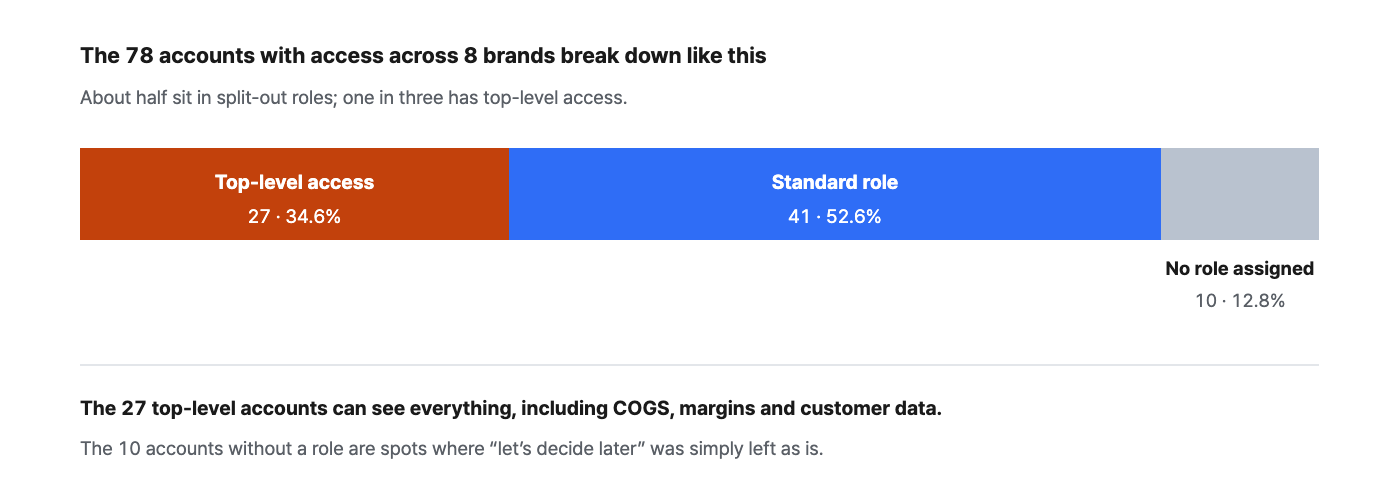
This is the current state, not the change history. We broke down what permissions the 78 accounts hold.
How to read the numbers
-
One in three accounts has top-level access. 27 accounts, 34.6%. Top-level access means the account sees everything, including COGS, margins and customer data. In most cases these are accounts that started out as "just make them an admin for now" when the team was small, and stayed that way.
-
10 accounts (12.8%) have no role at all. These are the spots where "let's decide later" was left as is. Without a role, what the account can see isn't defined either, so there's nothing to judge it against during a review.
-
7 accounts (9.0%) are on external domains. Agencies, partners, contractors. That means one in ten is an outsider, and which columns they can see is the core question of this post.
But there's something you miss if you only look at the account list: invitations that haven't been accepted yet.
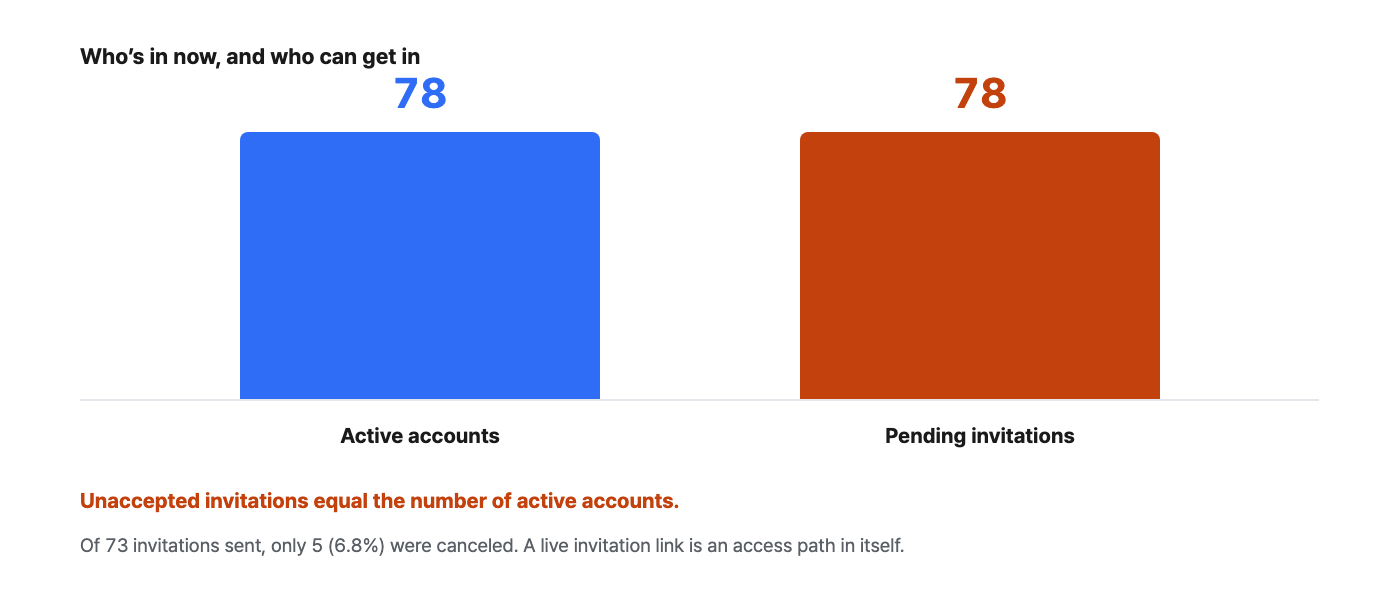
An invitation is a live access path
How to set it up
-
Open the pending list in Permission Settings › Invitations. Set the status filter to "Awaiting acceptance" and only live links remain.
-
Sort by date sent and look first at invitations older than 2 weeks. People who haven't joined within that window usually never will.
-
Cancel invitations for finished collaborations, people who have left and mistyped addresses. You can always resend if needed, so canceling is a reversible decision.
-
Keep the invitations you need with a role assigned. An invitation without a role adds one more to those 10 role-less accounts the moment it's accepted.
Next screen — We've counted who's in. Now let's see what we can block it with. On to PART 5. ›
PART 5. The trap — the tools exist, but nobody uses them
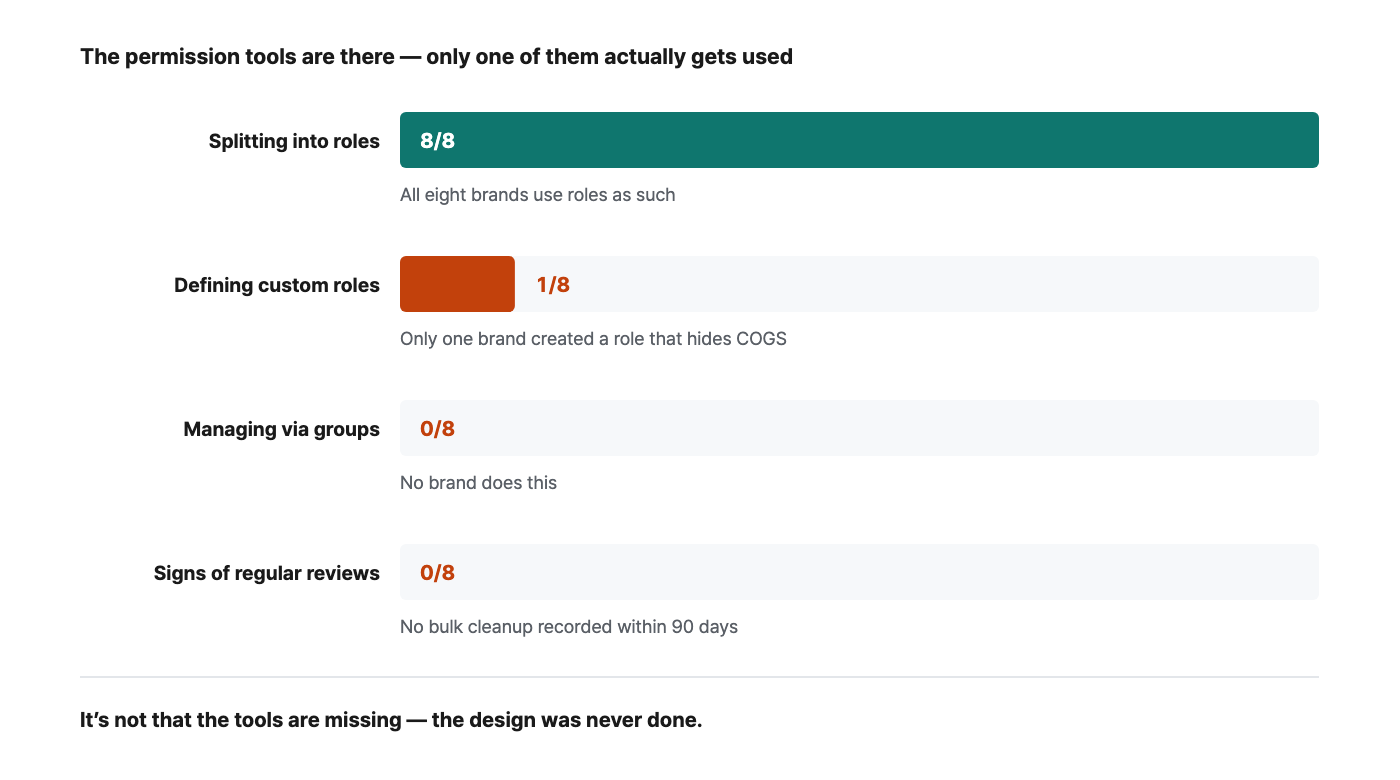
Oversharing doesn't happen because permission tools are missing. We counted how widely each tool is used across the 8 brands.
How to read the numbers
-
All eight brands use roles as such. But for most, it amounts to placing people into the default roles (Admin, Viewer and so on). What to hide in each data area isn't defined.
-
Only one brand has created custom roles. And the names of the roles it created are telling — "No access to formulas or charts that include COGS" and "Can register COGS only." The need exists everywhere; only one brand actually did the design.
-
No brand manages access through groups. As headcount grows, individual settings grow with it, and from that point on nobody can answer "who sees what."
-
No brand shows any sign of a bulk review in the last 90 days either. The 5.5 : 1 in PART 3 is the result of this.
The most common hole isn't the source data — it's what's derived from it
Next screen — We know what gets blocked. Now let's design it all on a single table. On to PART 6. ›
PART 6. Design starts with a single table
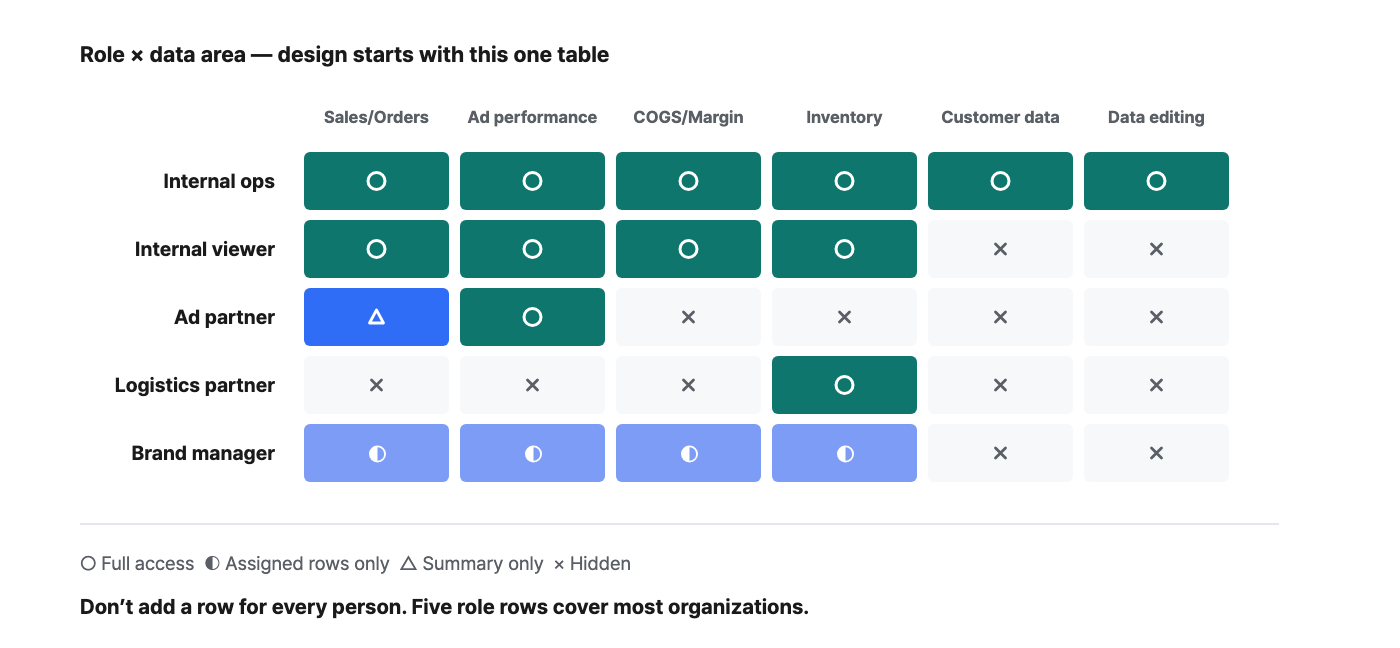
Splitting access into "allowed/denied" per person isn't enough. Within the same dashboard you need control at the level of "everything except this column" or "only these rows (brands)." Without it, you end up duplicating the dashboard once per person, and the copies slip out of management to become yet another leak path.
| Scenario | What they need to see | What they must not see | Common way things go wrong |
|---|---|---|---|
| Ad agency | Campaign performance, channel traffic, ROAS | Product COGS, margin rate, other agencies' performance | A margin chart is mixed into the "ad dashboard" |
| Logistics / fulfillment partner | Inventory quantities, inbound/outbound, planned purchase orders | Selling prices, sales, customer data | A sales summary sits on the inventory dashboard |
| New hires / outsourced merchandisers | Metrics for the categories they handle | Company-wide P&L, COGS, strategy for other categories | Starting on day one with "full access for now" |
| Multi-brand managers | All metrics for the brands they manage | Sales and COGS of other brands | Dashboards are duplicated per brand and leak out of management |
How to set it up
-
Split data sensitivity into just three levels — Locked (COGS, margins, customer data) / By role (sales, inventory) / Open (traffic, visits). Any finer and nobody will keep it up.
-
Define roles first, not people. The five rows in the matrix above cover most organizations. The more roles you add, the faster management falls apart.
-
Attach column masking and row filter policies to each role. Then turn on auto-apply to derived data so the policy follows into summary charts and copies.
-
Start external sharing as view-only. Widening access happens when someone asks; narrowing it never comes with a request.
Next screen — The design is done. What's left is a revocation routine. On to the action plan. ›
Action plan — 4 weeks
| Week | What to do | Definition of done |
|---|---|---|
| Week 1 | Pull a full list from Permission Settings › Members and Invitations. Clean up pending invitations first | You can state the number of external accounts and pending invitations |
| Week 2 | Classify sensitivity into 3 levels + define the five role rows | The single matrix table exists as a document |
| Week 3 | Link column masking and row filters to roles; turn on auto-apply to derived data | You logged in with an external account and saw for yourself that COGS isn't visible |
| Week 4 | Add a "revoke access" item to the offboarding checklist + put a quarterly review on the calendar | The next review date is on the calendar |
Once a quarter, 15 minutes is all it takes
Summary
-
Permissions only ever grow. 83 records of widened access vs. 15 of narrowed access in 90 days — 5.5 : 1. Because nobody ever asks for access to be revoked.
-
One in three accounts has top-level access. 27 of 78 (34.6%). Accounts that started as "admin for now" stay that way.
-
Count invitations before accounts. The 78 pending invitations equal the number of active accounts, and they don't show up in the account list.
-
It's not that the tools are missing — the design was never done. Only 1 of 8 brands had created custom roles, and 0 used groups.
-
Derived assets leak more than the source. Policies have to follow into summary charts and duplicated dashboards, and metrics that include margin let your COGS be backed out.
Settings to reproduce this
| Item | Value |
|---|---|
| Screens | Permission Settings › Members / Invitations / Roles / Audit Log |
| Audit log period | 90 days (at 30 days the sample is too small and the ratio swings) |
| Target types | Members · Invitations · Roles |
| Actions counted as widening | Invitation sent · Invitation accepted · Role assigned · Share created |
| Actions counted as narrowing | Account removed · Invitation canceled · Role revoked |
| Sample | 8 brands · 78 accounts with access · 229 change records |
Frequently asked questions
Q. Do we need permission management even as a small team? If you have even one external partner, yes. Oversharing scales with the number of times you share, not with the size of the organization, and the smaller the team, the more easily "just share everything" becomes the norm. Start with a minimal design that only decides what to lock (COGS, margins, customer data).
Q. I want to show ROAS to our agency but hide margins. That's exactly what column masking is for. Apply COGS and margin column masking to the ad partner role, and they see only the performance metrics on the same dashboard. Just note that derived metrics with margin in their calculation can be reverse-engineered, so decide separately whether to expose them.
Q. We run several brands, and the managers must not see each other's data. Set up a brand-based split with a row filter policy, and within the same project each person sees only the rows for their own brand. It's far less of a management burden than duplicating dashboards per brand, and there's no problem of copies leaking out of management.
Q. Won't strict permissions slow collaboration down? Often it's the opposite. When sensitive data is structurally hidden, you no longer have to agonize over whether to share each time, so sharing gets faster. Governance isn't a brake on sharing — it's a seatbelt.
Q. Where should we start? There's just one thing to do today — review your pending invitations. Count them before accounts; in most cases this list alone surfaces items to clean up right away (finished collaborations, people who have left, mistyped addresses).
Closing thoughts
As data use grows, sharing can only grow too. For a growing team, the question shouldn't be "should we share or not" but "how much should be visible" — and governance means putting that answer into the system rather than relying on people being careful.
The accounts that can access your project right now, and your pending invitations — open them in Permission Settings today. 15 minutes is plenty.
The figures in this report are not actual transaction data; they are illustrative values generated to reflect the distribution of Laplace benchmark metrics. They are not the actual figures of any specific customer, so please use them to understand trends rather than as absolute values. Figures from public research are cited with their sources in each item. Screen names and setting names may differ slightly depending on the release.